Once a deck grows, linear clicking is no longer enough. Cards repeat, important topics appear in the wrong place,
some questions are too broad, and the deck loses its internal structure.
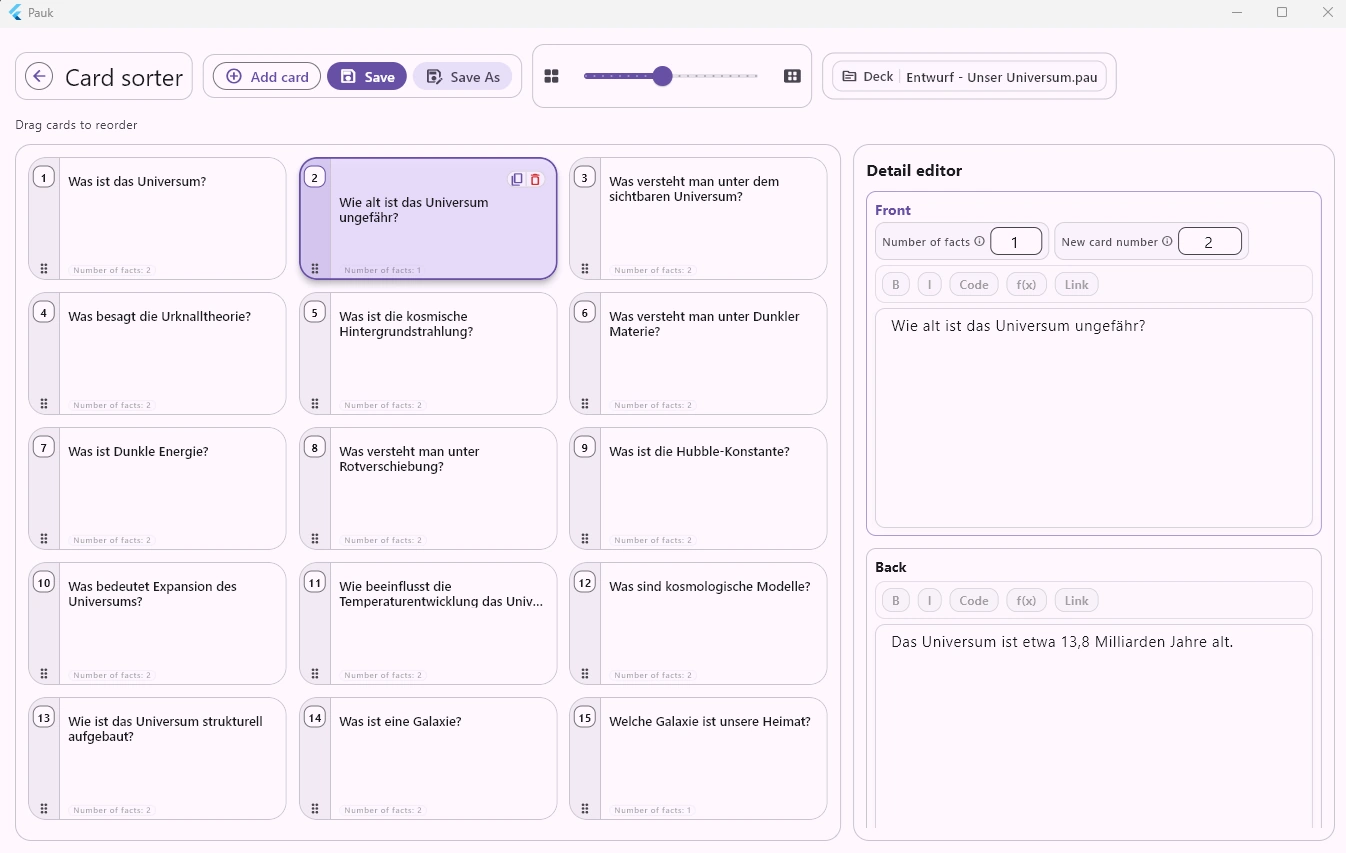
The Pauk card sorter gives you a compact visual overview of your deck. This means you do not just study cards,
you actively structure, improve, and prepare the deck for exam use.
Why a Card Sorter Matters
Many flashcard apps treat cards like a simple review list. That works for small decks. For larger exam topics,
it quickly becomes difficult:
- similar cards are spread far apart
- foundations, details, and edge cases get mixed
- weak cards stay in the deck because you never see them systematically
- new cards are just appended at the end
- the order no longer supports your learning progression
The card sorter solves exactly this problem. It gives you full-deck visibility and makes structure editable.
Reorder Cards with Drag and Drop
In the card sorter you can move cards directly. Bring foundations to the front, build topic blocks, and place
detail cards where they make didactic sense.
This is especially useful after generating cards from a PDF, a text file, or a topic and then refining the order.
Compact Overview Instead of One-Card Mode
The card sorter displays many cards at once. You can immediately see which questions are in the deck and how they
relate to each other.
This helps you detect faster:
- duplicate or near-duplicate questions
- missing foundations
- oversized topic blocks
- cards that belong in a different position
- questions that are unclear or too general
What Improves After 30 Minutes of Cleanup
A large deck does not need to be perfect before you study. Even 30 minutes in the card sorter can change a lot.
You move foundations before details, detect duplicate or very similar cards, find cards with too many facts,
and correct unclear questions directly in the detail editor. At the same time, gaps become visible: if a topic
suddenly jumps or an explanation is missing, the overview makes it obvious.
The result is not a cosmetically sorted deck, but a more learnable one: clearer order, less ballast, more precise
cards, and better control over your material.
Detail Editor for Front and Back Side
When you select a card, you can edit it directly in the detail editor. Front and back remain visible and can be
corrected immediately.
You do not need to jump between sorting, searching, and editing. Structure work and card correction happen in one place.
Fact Count and Card Number at a Glance
Pauk shows the fact count per card. This helps make cards more learnable.
A good flashcard should be clear and as atomic as possible. If a card contains too many facts, it becomes harder to
learn and harder to review. In the card sorter you spot these cards faster and can improve them immediately.
Built for Large Decks
The card sorter is especially useful when your deck is not ten cards, but many topics, subtopics, and details.
Typical situations:
- you are preparing for an exam
- you generated cards from a PDF or text
- you want to clean up an existing deck
- you want to insert new cards in a meaningful place
- you want to structure a deck before focused review
Part of the Pauk Learning Flow
The card sorter is not a separate add-on tool. It is part of the Pauk learning flow.
You can create, review, sort, edit, and then study with Leitner or spaced repetition. If a weak card appears
during review, you can correct it directly and continue from the same card.
Local Deck Files
Pauk works with local .pau files. Your decks stay with you and are not locked to a web portal.
The card sorter therefore helps not only with study sessions, but also with long-term maintenance of your own
flashcard collection.
Who Is the Card Sorter For?
The card sorter is especially useful for:
- students with large exam topics
- people generating flashcards from PDFs or text
- users who want to improve cards actively, not only repeat them
- anyone who wants to keep large decks structured and clear